

Can't find what you're looking for? Send us an email...
Xrev Transmit
- How do I setup all my workstations to use the same settings?
- What PDF printers does Xrev Transmit support?
- I use a different PDF printer to the ones supported, will Xrev Transmit work with that?
- Does Xrev Transmit send the drawings as well?
- We currently use Newforma Project Centre, will Xrev Transmit work with it?
- We already have an existing SQL Server database, can Xrev Transmit connect with it?
- Can I customise the Transmittals?
- My project is made of multiple files each containing sheets that need to be issued, does Xrev Transmit work with linked files?
- I’ve setup all the issue formats for my project can I reuse these settings on a new project?
- I am a BIM Manager and I want to lock down the formats once I’ve set them up so no one else can modify them, is this possible?
- Sometimes when I print, certain sheets don’t print as expected, that is some information is missing?
- How can I change / increase the revision of a sheet to issue?
- In Xrev Transmit I’m trying to edit multiple rows simultaneously by using shift click and it’s not working?
- We are a multi-disciplined firm, is it possible to have sheets filed in discipline specific folders?
- Why is my Xrev Transmit installation failing?
- I receive the following error on the Update Data step "Validation failed for one or more entities"?
Xrev Freebies
Purchasing & Subscription
- I didn’t receive my serial code?
- How do the product subscriptions work?
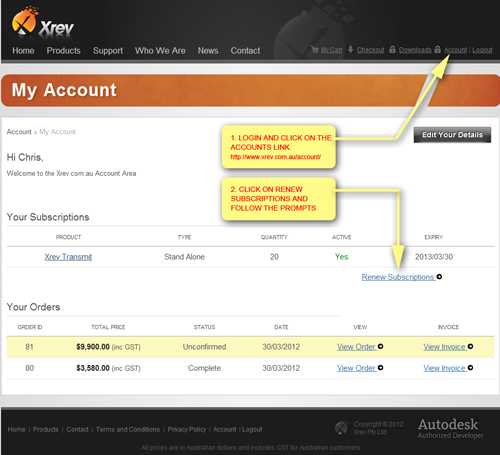
- How do I renew my subscription?
- How do I know how much time is left on my subscription?
- What payment methods do you take?
- How do you deliver my product?
- Do you have network licensing?
Xrev Transmit
How do I setup all my workstations to use the same settings?
There are public properties contained with the MSI files allowing you specify by command line the database location and serial number during installation. Alternatively it requires manually editing one of the configuration files and setting the data file path. This is quite simple to do. Please refer to this PDF.
What PDF printers does Xrev Transmit support?
Currently we supported automated naming without popup dialogs for BioPDF (Supplied), Adobe PDF, Bluebeam PDF & PDF Creator.
I use a different PDF printer to the ones supported, will Xrev Transmit work with that?
If required and the demand is there we can add support for additional PDF printers provided they have the appropriate API’s available. There is the potential that other PDF printers may work, but these are currently unsupported. For example, we cannot add support for PDF-Xchange due to the way their API works.
Does Xrev Transmit send the drawings as well?
Xrev Transmit currently creates all the files, prints and creates the transmittal. You still use conventional methods of email, ftp, buzzsaw and other online document management systems to distribute the files. We do support Aconex, an online project management system, you can publish your files to here and then distribute them on Aconex.
We currently use Newforma Project Centre, will Xrev Transmit work with it?
Yes, provided you have the Newforma Document Record Number within the file name, the Auto-link functionality of Newforma will find the appropriate sheets in the register. The normal workflow would be:
- Sync the Sheet data from Revit using Newforma Project Centre,
- Use Xrev Transmit to output the deliverables in the required formats (PDF, DWG, DGN, DWF, etc) to the required location in the folder structure,
- In Newforma Project Centre use the Auto-Link functionality to update the Document Records with the latest version of the files,
- Use Newforma Project Centre to send the latest documents to the rest of the Project team.
Newforma's API currently would not permit any greater level of integration than this.
We already have an existing SQL Server database, can Xrev Transmit connect with it?
This is currently not part of the standard installation but please discuss with our support team as we may be able to assist in customising the software for you to do so. We are very close to supporting other SQL Servers.
Can I customise the Transmittals?
Yes, Xrev Transmit utilise the XML functions of Word 2007 (or later) allowing for full customisation of your transmittal templates in Microsoft Word or using our built-in Report Designer (recommended). If required, we can assist in customising your transmittal template to achieve your desired output for an additional fee.
My project is made of multiple files each containing sheets that need to be issued, does Xrev Transmit work with linked files?
Yes, Xrev Transmit separates the Print & Export process and transmittal generation process. Simply Print & Export all the files you need from the various files, and providing the Project Number is the same, they will all be available for selection in the Transmittal wizard.
I’ve setup all the issue formats for a project can I reuse these settings on a new project?
Yes, format settings can be named and saved for future use in a "Profile". You can create as many profiles as you like, you can duplicate existing ones and modify them if they are largely the same or create them from scratch.
I am a BIM Manager and I want to lock down the formats once I’ve set them up so no one else can modify them, is this possible?
Yes. In version 3.0 onwards you can now disable the "Settings" button on particular workstations to prevent unauthorised users accessing the Settings and modifying them.
Sometimes when I print, certain sheets don’t print as expected, that is some information is missing?
This is a bug within Revit. Occasionally certain elements on a sheet may choose not to print, this can usually be corrected by printing this particular view with raster settings.
How can I change / increase the revision of a sheet to issue?
Xrev Transmit utilises the built-in Revit revisioning system. As such, to increase a revision on a sheet, place a cloud on that sheet and ensure it is associated to the appropriate revision sequence number. You can also edit the revisions on the sheet in the instance properties of the sheet to force a revision to display where a cloud isn’t applicable. Refer to Revit help for further information. You can also use Xrev UpRev, a free tool for quickly adding a revision to many sheets at once. At Xrev we don't believe in messy hacks to workaround existing Revit functional limitations.
In Xrev Transmit I’m trying to edit multiple rows simultaneously by using shift click and it’s not working?
Shift click to highlight the rows you wish to edit, they should highlight a pale blue. Right click on the cell that contains the correct info and choose "Copy to selected". All rows should update with the new information. You cannot do multiple columns at the same time.
We are a multi-disciplined firm, is it possible to have sheets filed in discipline specific folders?
Yes, this is easily achieved by having a sheet parameter for Discipline. The common assumption our users make is trying to use sheet parameters in the global or project output locations, only project information parameters can be used in this section as how would we know which sheet to use? To achieve this you need to include the s.discipline tag (dependent on what you called it) in your format naming conventions. Contact us if you require further assistance.
Why is my Xrev Transmit installation failing?
Essentially an install can fail for 4 reasons:
- Use of the incorrect installer, IE: Trying to install the 64bit version on a 32bit machine or vice versa,
- Corrupt Installer, which can occur if the download is interrupted,
- Inability to upgrade the database either because someone is accessing it at the time or insufficient permissions,
- Insufficient permissions to install to one of the installer locations.
I receive the following error on the Update Data step "Validation failed for one or more entities"?
This error could occur for a number of reasons, but the most common is when a user has previously used BIMLink. BIMLink creates a parameter in "Project Information" called "Ideate BIMLink". The body of which contains an entire XML data structure which exceeds the character limit for a string in Xrev Transmit. Clearing or removing this value will resolve the issue.
Xrev Freebies
Purchasing & Subscription
I didn’t receive my serial code?
It is possible that your serial code email could be blocked by your spam filter. We plan to add functionality to view your serial codes by logging into www.xrev.com.au with your account details where they are stored in the members area for your convenience. Otherwise contact our support and we'll resend your serial number.
How do the product subscriptions work?
When you purchase a product we provide a serial supporting all previous releases. For instance, if you bought a license in 2016, you would get a serial that supports Revit 2012-2017. This license is expiring and if you let your subscription lapse it will cease to function. Each product has its own subscription. You must maintain your subscription for each product and each license. The subscription also covers support. If you chose to only renew one subscription from 100 licenses. In this case you would only receive a serial valid for 1 license and you other 99 would expire on the subscription renewal date. This is similar to the way in which Autodesk manages their licensing of Revit.
How do I renew my subscription?
Log into the members area of www.xrev.com.au to purchase a subscription renewal for your existing licenses. Please ensure you do this prior to subscription expiry. If your subscription expires and you later decide you wish to renew please contact us immediately, otherwise to upgrade you may need to repurchase the software.
How do I know how much time is left on my subscription?
Log into the members area of www.xrev.com.au to view your subscription details including expiry date and coverage report.
What payment methods do you take?
Xrev accepts payment via credit card (VISA/MasterCard), PayPal or Direct Deposit into our account. For international direct deposit please ensure you include payment to cover all fees associated with sending the payment. Xrev will pay any fees in receiving the payment. If you do not cover the fees this may delay your order.
How do you deliver my product?
Delivery is via download from our website, which we strongly suggest you return to regulary to access product updates. Once funds have cleared into our account we will email through the serial number valid for your purchased number of products.
Do you have network licensing?
Technically No. We offer Site/Enterprise Licenses for firms running Network Licenses or Global Licenses of Revit (contact us for details). Our licensing offers many of the same benefits of traditional network licenses. We offer tiered standalone pricing with significant discounts of up to 30% per license. Network licensing would not work out cheaper than this. You receive a single serial for all licenses purchased. You can deploy via login script. We allow extended activation based upon your number of "Revit Network Licenses". That is, if you have 144 Revit Network licenses deployed over 300 machines, you will only require 144 Xrev licenses.